

Your Three-Line Fix Is a Blank Check
Picture the moment: your AI agent makes an API call, and it fails. Nothing dramatic — just a brief network hiccup, the kind that clears up on its own a second later. The standard fix is almost reflexive: wrap the call in a loop that waits a moment and tries again, catching the error so it doesn't crash the program. Three lines of code, problem solved. Every developer has written this pattern, and in a simple script, it's a fine solution.
But in a production AI system — one where agents call other agents, which call tools, which call external APIs — that same three-line fix stops being a harmless patch. It becomes an open-ended promise to pay for whatever happens next.
Here's the problem: that simple loop doesn't know it's one link in a chain. When an agent calls another agent, which in turn calls a tool, each layer might have its own "just retry it" logic bolted on. A single temporary failure at the bottom of that stack can trigger retries at every layer above it, and those retries trigger more retries below them. What started as one user request can multiply into dozens or hundreds of paid API calls before anyone notices.
This isn't a hypothetical. Padiso, a consultancy that builds AI agent systems for enterprise clients, has watched unhandled tool errors turn what should have been routine work into runaway bills — describing it as "the difference between a $50 API call and a $5,000 runaway loop." The real cost of a failure isn't the one failed call. It's every repeated attempt it sets off, multiplied at each layer of the system that reacts to it. Handling errors well isn't just about keeping the program from crashing — it's a form of budget control.
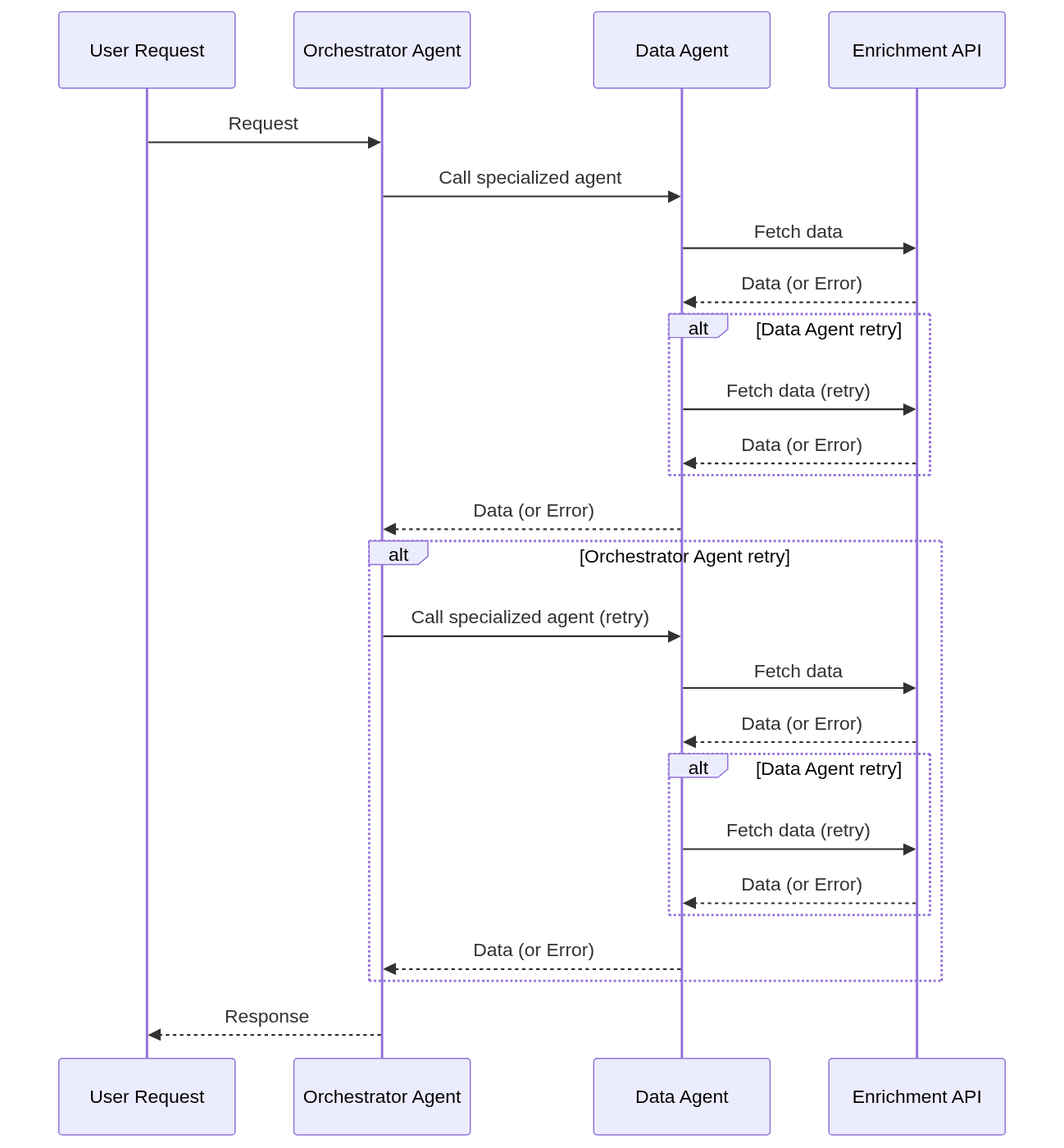
The Math of a Minor Outage: How Costs Explode
The danger of simple retries is a phenomenon called retry amplification. It occurs when multiple services in a call chain each have their own independent retry logic. A failure in the final service causes the service above it to retry its entire operation, which in turn re-triggers all the attempts to the failing service.
Let's model a common agent pattern:
A User Request comes in.
An Orchestrator Agent receives the request and decides to call a specialized agent.
A Data Agent is tasked with fetching and enriching data. It calls an external API.
An Enrichment API provides the data.
Now, let's say the Orchestrator and the Data Agent each have a simple policy: "if a call fails, retry it 3 times." The Enrichment API at the end of the chain starts experiencing intermittent failures, perhaps due to a rate limit.
Here's what happens on a single user request:
The Data Agent calls the Enrichment API. It fails.
The Data Agent retries. It fails again.
The Data Agent retries a second time. It fails.
The Data Agent retries a third time. It fails.
Having exhausted its 3 retries, the Data Agent gives up and returns an error to the Orchestrator Agent. It made 4 total calls (1 initial + 3 retries) to the API.
Now the Orchestrator sees the failure from the Data Agent. Its own retry logic kicks in.
The Orchestrator retries its call to the Data Agent. This is its first of three retries.
The Data Agent, now in a fresh operation, starts over. It calls the Enrichment API 4 more times before failing and reporting back up.
The Orchestrator sees the second failure and triggers its second retry. This results in another 4 calls to the API.
The Orchestrator's third and final retry triggers yet another 4 calls.
Let's count the total API calls. The initial attempt from the Orchestrator led to 4 API calls. Each of its 3 retries led to another 4 calls.
Total API Calls = 4 + (3 × 4) = 16 calls.
A single user request that should have made one API call resulted in 16. If the API costs $1 per call, you just paid $16 for a single failure. Now imagine a deeper chain. If you have d layers of services, each with a retry count of N, a persistent failure at the bottom layer can result in (N+1)^d total calls. With 3 retries (N=3) and 4 layers (d=4), that's (3+1)⁴ = 256 calls.
This is how a $50 task becomes a multi-thousand-dollar incident.
Beyond Backoff: Four Strategies for Sane Retries
The standard answer to retry storms is exponential backoff, which adds an increasing delay between attempts. This is critical for handling rate limits — the most common error in high-volume data workflows — by giving the throttled service time to recover. But it doesn't solve the cost problem. It just spreads the 256 expensive API calls over a few minutes instead of a few seconds.
To build resilient and cost-effective agents, you need a more sophisticated approach. This involves treating retries not as a simple loop, but as a managed resource with budgets, alternatives, and clear visibility. The mental model to use here is an escalation ladder, a concept detailed by developers at Anthropic for building resilient systems. It outlines four responses to failure, applied in sequence from cheapest to most destructive.
1. Retry Intelligently (But Not Forever)
The first rung of the ladder is to retry the operation, but with guardrails that prevent hammering a struggling service. This is for transient failures like network timeouts or temporary load spikes.
A best-in-class implementation of this idea comes from Amazon Web Services. In a recent update to their SDKs, they introduced a new standardized retry system that developers can opt into. This system includes a crucial component: a retry quota.
The quota works like a token bucket. Your application has a pool of retry tokens.
A successful request may replenish some tokens.
A failed request that triggers a retry consumes one or more tokens.
If you try to retry but have no tokens left, the SDK immediately fails the request without making another attempt.
According to AWS's documentation, this mechanism is designed to make your application "fail fast" when retries are unlikely to succeed. It also helps the struggling downstream service recover more quickly by shedding load from excessive retries. During normal operation, the quota stays full and has no impact. But during an outage, it acts as a circuit breaker.
The AWS SDKs also formalize different retry behaviors into modes. The default standard mode uses exponential backoff and the retry quota. For workloads that are extremely sensitive to throttling, an adaptive mode is also available, which can be even more aggressive in slowing down requests.
How to apply this:
Don't just loop; use a library that implements exponential backoff with jitter.
If your cloud provider offers it, use a managed retry policy with a token bucket or circuit breaker mechanism.
Set a hard cap on the number of attempts (
max_attempts). This is your last line of defense.
2. Cap the Total Budget, Not Just the Attempt Count
A limit on max_attempts is not a limit on cost. As our amplification example showed, 3 retries can turn into 256 calls. The most direct way to prevent a runaway bill is to manage the budget directly.
Instead of (or in addition to) max_attempts, your agent's context should include max_task_cost. Before every tool call — especially before a retry of a tool call — the agent performs a simple check:
# Pseudocode for a budget-aware retry
current_task_cost = get_cost_so_far(task_id)
estimated_attempt_cost = estimate_cost(tool_name, tool_inputs)

if current_task_cost + estimated_attempt_cost > max_task_cost:
  # Budget exceeded, stop retrying and escalate.
  log.warn(f"Stopping task {task_id}: budget exceeded.")
  escalate_failure(reason="budget_exceeded")
else:
  # Proceed with the attempt.
  execute_tool()
This check transforms cost from an unpredictable outcome into a direct control mechanism. It guarantees that a single task can never cause a massive budget overrun, no matter how many retries are triggered by its dependencies. It answers the question, "Can I afford to try this again?" If the answer is no, you stop, even if you have retries left in your counter.
3. Build an Escalation Ladder
Retrying is not the only option. When a simple retry fails or is deemed too expensive, your system needs to know what to do next. The escalation ladder provides a formal path.
Retry: As discussed, this is for transient errors. It's the cheapest option, costing only latency.
Fallback: If retries fail, is there another way to accomplish the goal? If your primary, high-quality translation tool fails, perhaps you can call a cheaper, lower-quality model. If the primary vector database is down, can you fall back to a keyword search? This rung costs you quality or performance but may save the task.
Degrade: The fallback has also failed. Can the overall task still succeed without this specific capability? For an agent writing a report, perhaps it can complete the report without a specific chart if the visualization tool is broken. In this step, the agent acknowledges the failure and removes the broken tool from its available options for the remainder of the session. The cost is a lost feature.
Fail: This is the last resort. If the failed tool was essential to the task, there is no way forward. The system must stop and return a clear error to the user or the calling system. The cost is the entire task, but it's preferable to looping indefinitely or returning a hallucinated, incorrect result.
This structure, described in Claudepedia's developer documentation, moves error handling from a binary retry/fail decision to a nuanced, cost-aware process.
4. Make Retries a First-Class Citizen in Your Logs
A retry that eventually succeeds looks like a success in your top-level metrics. This is a dangerous lie. If a key endpoint has a 30% transient failure rate, but your retry logic papers over it, your system might appear healthy right up until the point that the failure rate hits 50% and your retry quotas are exhausted.
You must make the "work" of retrying visible.
Log every attempt: Don't just log the final failure. Each retry attempt should be a distinct log entry or trace span, tagged with the attempt number.
Track retry rates: Your observability dashboards need a chart for
retry_rate_per_endpoint. A rising trend is an early warning sign of a degraded dependency.Measure cost-per-successful-task: This metric should include the cost of all failed attempts that contributed to the final success. If a successful task cost $2 but required three failed $1 attempts to get there, its true cost was $5.
Without this visibility, you are flying blind. Retries hide problems. Your job is to make them visible again so you can fix the root cause, rather than just surviving it.
When Is a Simple Retry Loop Okay?
After all this, is the three-line for loop ever the right choice? Yes, but only under specific, isolated conditions.
A simple retry loop is often sufficient for standalone, non-critical background jobs. Consider a script that runs once a night to download a file from an FTP server.
It is not part of a chain of other retrying components, so there is no risk of amplification.
It is not user-facing, so a few minutes of added latency from backoff is acceptable.
The cost of a single attempt is zero or negligible.
Even in simple business automation, however, the limits become apparent. In a B2B data enrichment workflow, a single network blip can cause a job to fail silently, losing hundreds of potential contacts for a sales team. As noted by the team at Derrick, an SDR enriching 2,000 contacts a week could lose 200 to 300 of them from one such failure. While a simple retry might fix the blip, a more robust system would also include state management to ensure the job can resume from where it left off, rather than starting over.
The dividing line is clear: if the component you are building is part of a larger system, or if a user is actively waiting for its response, a simple retry loop is not enough. The risk of retry amplification and the need for immediate, predictable failure modes require a more structured approach.
From Liability to Resilience
Treating error handling as an afterthought — something bolted on once the "real" logic works — is easy to justify when you're prototyping. It becomes a genuine liability once your agents are chained together and every call has a price tag attached. Your retry logic isn't a minor implementation detail; it's one of the few things standing between a predictable monthly bill and a five-figure surprise.
Concretely, that means three things for anyone building these systems. First, a retry count alone tells you nothing about cost — you need an explicit budget check (like the max_task_cost pattern above) that can halt a task regardless of how many attempts it has left. Second, retrying should be your first option, not your only one: an escalation ladder that moves from retry to fallback to degraded operation to a clean failure gives your system somewhere to go when the cheap option doesn't work. Third, retries need to show up in your logs and dashboards as the work they are — a "successful" task that quietly cost five times its sticker price is a problem you can't fix if you can't see it.
None of this is exotic engineering. It's the difference between a system that happens to work in a demo and one that can be handed real tasks and a real budget without supervision. The open question for most teams isn't whether to build this — it's whether they find out they need it before or after the bill arrives.